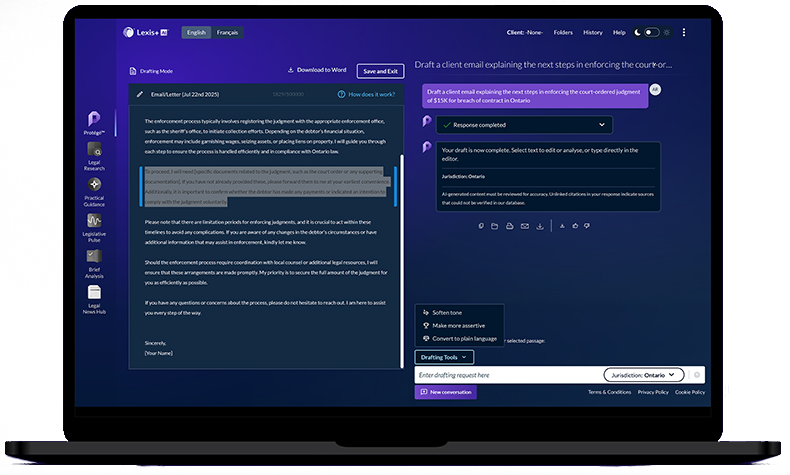
LexisNexis® is committed to continually improving our solutions. As part of this effort, we’re excited to introduce Protégé™ — the new AI assistant in Lexis+ AI™. Protégé has replaced the AI Assistant in Lexis+ AI, streamlining your drafting and research tasks.

To meet your personalized AI assistant backed by 50+ years of legal research, register for a LexisNexis ID today.
Introducing Protégé™ — now available to Canadian Law Schools
LexisNexis Training for Law Students
Our training program for law students will continue to emphasize the classic skills and principles of legal research, including the use of primary and secondary sources, keyword and Boolean searching, legal citation, and updating references (noting up). These skills will continue to be taught in the “Lexis+ Canada Basics” sessions offered to all law students in Canada prior to Lexis+ AI training.
Our approach to Lexis+ AI training will aim to prepare students for legal practice by showing how lawyers use generative AI in their work. These AI-focused sessions will inform students about legal LLMs as opposed to general-purpose LLMs, include an FAQ on confidentiality, hallucinations, and citation verification, cover best practices for prompt writing, and highlight recommended use cases.
Student sessions can be booked by emailing your usual LexisNexis training contact or by writing to training@lexisnexis.ca.
LexisNexis Law Student Training
Our training program for law students will continue to emphasize traditional legal research skills and principles, including primary and secondary sources, keyword and Boolean searching, legal citation and noting up. These skills will continue to be taught in “Lexis+ Canada Basics” sessions being offered to all Canadian law students. To prepare for student access, Lexis trainers are available to demonstrate and instruct students on Lexis+ AI through in-person and virtual training sessions under a supervised access model. This AI session will inform students on extractive versus generative AI, FAQs on confidentiality, hallucinations and citation, prompting best practices, and recommended use cases.
Student sessions can be booked by emailing your existing LexisNexis training contact or training@lexisnexis.ca.
New Account Registration
New law school users must request and obtain a LexisNexis ID registration link from an authorized person. Authorized persons include Law School Librarians and Faculty, LexisNexis Student Associates, LexisNexis Customer Service, or our LexisNexis Law School Program Manager. All new accounts must be created using a valid law school email address. To prevent unauthorized access to LexisNexis services, note that the law school self-registration page will no longer be accessible through the public LexisNexis website.
Personalized Training Sessions
To arrange for custom training sessions for your law school faculty, librarians, or student classes, you can reach us at training@lexisnexis.ca.
Lexis+ AI Resources
The Lexis+ AI Law School Faculty Guide provides information on faculty and student access, product information and user resources, and classroom integration tips. View or download it here.
Lexis+ AI how-to guides and videos, teaching resources, and other information related to Lexis+ AI is contained on this page.
FAQs for Law Schools
As we prepared with law schools through 2024 for law student access to Lexis+ AI, some common topics and questions arose from conversations with the schools. Here is how are continuing to address them:
Every Lexis+ AI response includes a reminder that AI-generated content should be reviewed for accuracy. Students will be reminded throughout their interactions that generative AI answers should be treated as a first draft and to always verify their work product.
In addition to the in-product guidance in Lexis+, we will continue to guide students through additional popup messages delivered as they use and return to Lexis+ AI. The first of these messages will remind students that they must comply with the academic integrity policies established by their school, faculty and professors in relation to the use of generative AI tools. Schools may also choose to deliver more specific messages to their particular students or faculty.
Lexis+ AI features in-product guidance and examples for each of these legal tasks: Ask a legal question, Generate a draft, Summarize a case and Upload a document, as well as guidance on how to write effective prompts. We will continue to educate Lexis+ AI users about recommended use cases and limitations for generative AI.
Our training program for law students will continue to emphasize traditional legal research skills and principles, including primary and secondary sources, keyword and Boolean searching, legal citation and noting up. For 1Ls in particular, we will teach traditional legal research skills prior to training on Lexis+ AI.
The law student landing page for Lexis+ Canada™ will continue to feature traditional legal research tools.
Our approach to training on Lexis+ AI will focus on preparing students for legal practice, showing how lawyers are using generative AI in their work. Lexis Product Adoption trainers and Lexis Law Student Associates will demonstrate and instruct students on Lexis+ AI through in-person and virtual training sessions next semester. To arrange training sessions for your law school, contact us at training@lexisnexis.ca.
We will continue to share teaching integration ideas and materials on our faculty webpage and in our faculty guide. Next semester, we will be hosting faculty meetings and information webinars. If you have AI teaching methods or exercises to share with other law schools, contact us at lawschools@lexisnexis.ca.
Answers to more frequently asked questions are available here: https://canada.lexisnexis.com/lexis-plus-ai-faq
Questions?
For more information, contact your LexisNexis Canada representative or email lawschools@lexisnexis.ca