![item image]()
29 Jan 2026
Author : Joyce Kirkpatrick Magruder
$core_v2_ui.GetViewHtml($post.File.FileUrl, "%{ AdjustToContainer = 'true' }")
Saving Jurisdiction Filters from Search to Search and from Session to Session on Lexis+® and Lexis+ AI®
On Lexis+ and Lexis+ AI, you can pre-select and save multiple jurisdiction filters directly from the homepage, ensuring that they are automatically applied to all your search queries. This feature not only saves valuable time when repeatedly searching within the same jurisdictions but also allows you to refine your results further using the post-search filters panel.
Following are the steps to save jurisdiction filters:
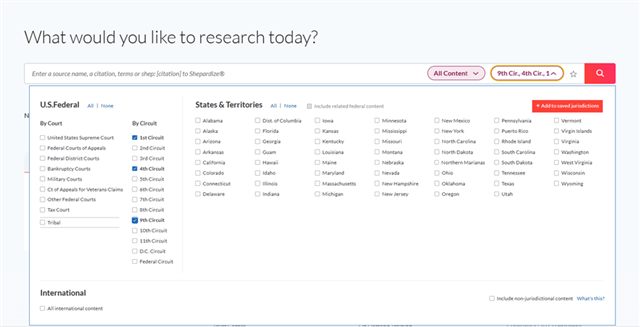
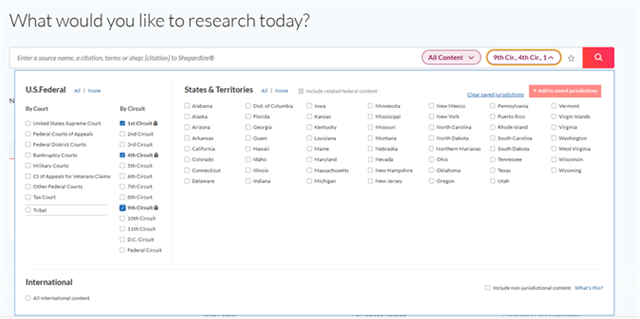
- From the Word Wheel expand on jurisdictions then select and then save selected jurisdictions:
- Choose preferred jurisdictions
- Click Add to saved jurisdictions
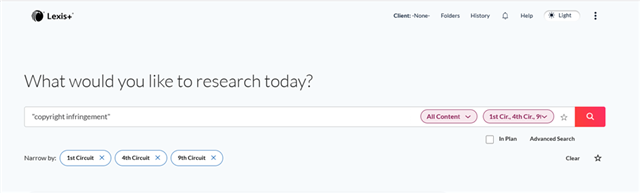
- In the Search Bar, your selected and saved jurisdictions will be visible, and they will carry over from search to search.
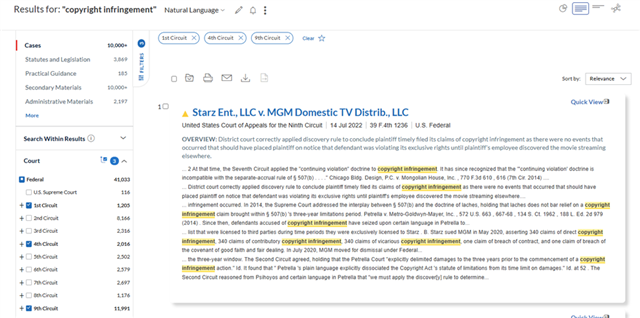
- The saved jurisdictions will also appear in filters panel on the left when displaying search results and will carry over to other content areas.
- To refine results:
- Use the left filter pane to add or remove jurisdictions, by selecting or deselecting them:
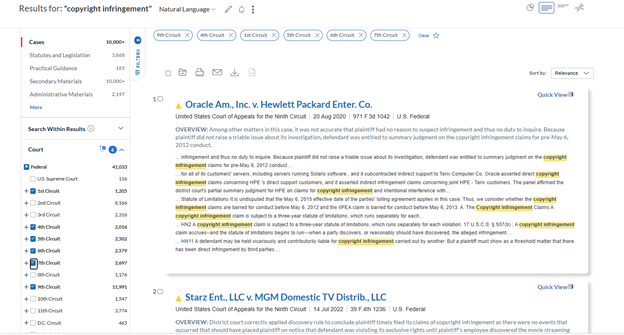
Note: Additional post-search jurisdictional filters will not persist across sessions unless they are set through the initial saved jurisdictions process. New filters applied from results panel are only temporary and will apply solely to the current search and current content area.
- To remove saved jurisdictions > click Clear saved jurisdictions
By pre-selecting and saving jurisdiction filters on Lexis+ and Lexis+ AI, you streamline your search process and ensure consistent, refined results every time. This feature saves you valuable time by automatically applying your preferred jurisdictions to all searches, while still allowing flexibility with temporary post-search adjustments.
We are here to help you navigate legal research, so if you have any questions, contact your Knowledge & Research Consultant, your account team, or your law school Lexis representative!