![item image]()
13 Nov 2025
Author : Nikki DiNatale
$core_v2_ui.GetViewHtml($post.File.FileUrl, "%{ AdjustToContainer = 'true' }")
Searching for Specific Sources in Your Results Set on Lexis+/Lexis+ AI
It may sound simple enough to whittle down your results set on Lexis+/Lexis+ AI according to the source.
However, if you are using the post-search Source filter, you might not find the source you need. The sources listed there show the top 20 from your results set. From the search below for company profiles on Microsoft Corporation, if you are looking specifically for Hoover’s Company Records- In-depth Records, the Sources filter does not reveal that in our lengthy results set.
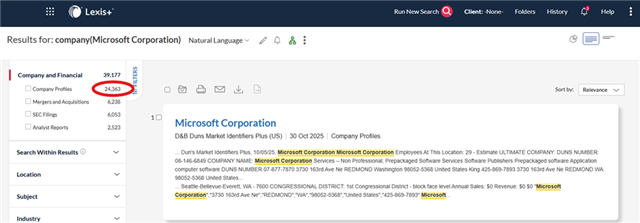
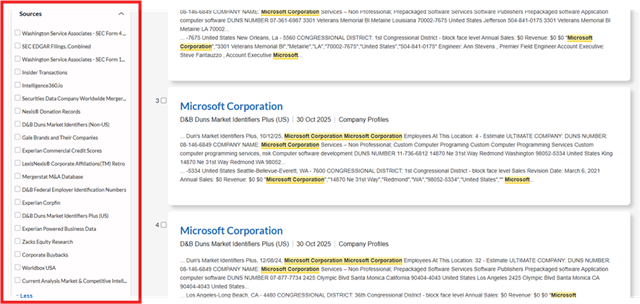
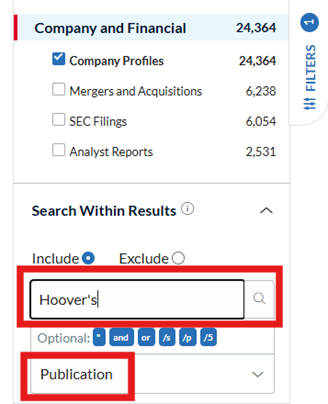
You can use the “Search Within” filter to pinpoint the specific source you need. Click into that search box on the filter bar and then you will be able to apply the Publication segment to reduce your results to only that source that you need.
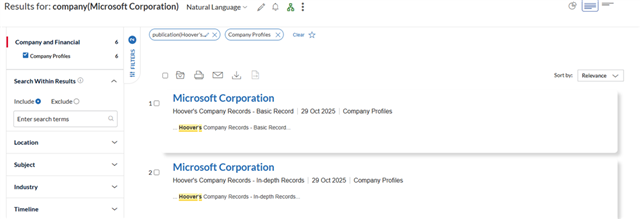
Now you will be presented with the company profiles from Hoover’s for your entity of interest.
If you have questions, reach out to your account team, law school rep, or KRC!